

Building a Download Service
This guide is aimed at helping you get started with creating a Download service. It will guide you to the relevant API endpoints to help you integrate with the MassiveMusic platform.
Postman public workspace
A collection of sample requests for each endpoint using Postman can be accessed here under Integration Guides.
High-level integration overview
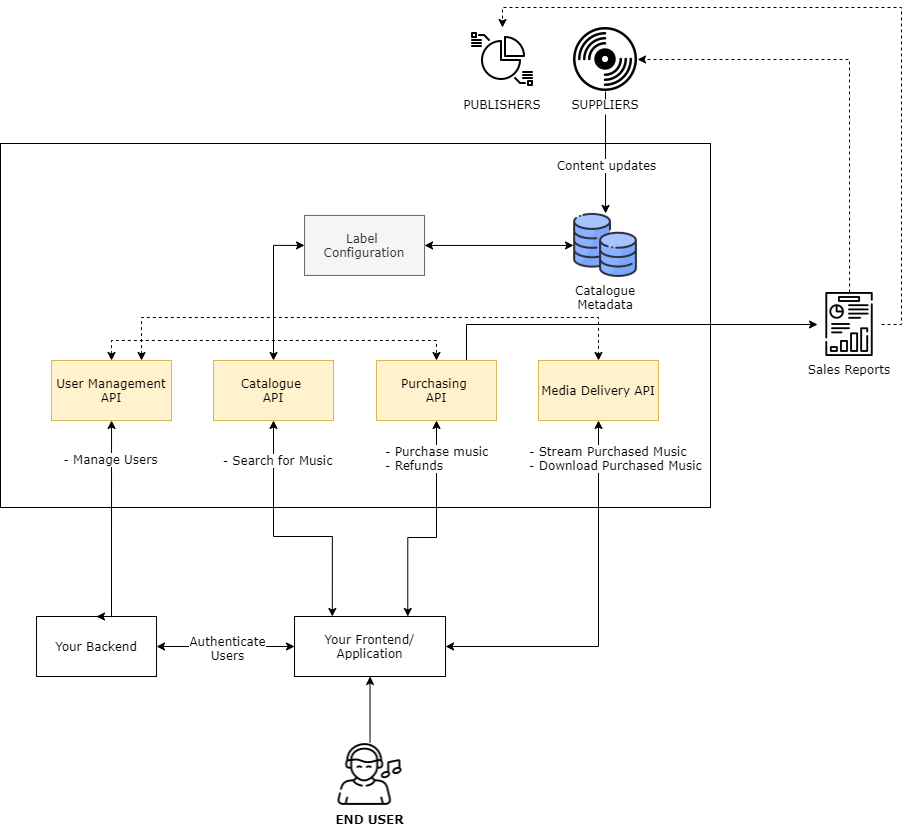
1. What is a download service?
A Music Download Service allows you to sell your licenced catalogue to your end users in various different audio formats. You have full control over the retail price that you wish to charge customers, and can be confident that your monthly rights holders sales reports are accurate via the use of the MassiveMusic API endpoints listed in this guide.
2. Setting up your users
For each user of your download service, you need to create a user with MassiveMusic. When creating a user simply use a unique identifier as MassiveMusic will not store any other identifiable or login information (e.g. passwords, usernames).
Use the following endpoint to create a new user:
| Attribute | Type | Description |
|---|---|---|
| userID* | string | Your 3rd party user identifier can be an arbitrary string up to 255 chars. The userId is permanent and cannot be changed once created. |
| country* | string | ISO 2-character code of the country the end user resides in. |
Error Codes1001 - Missing parameter - A required parameter is missing
1002 - Invalid parameter value - A parameter has been supplied with invalid value
2003 - User already exists - A user with this user id has already been created
3. Purchasing music
When your users purchase any music, you must log each sale back to MassiveMusic so that it can be recorded in your monthly rights-holders reports.
Use the following endpoint to log each sale:
| Attribute | Type | Description |
|---|---|---|
| userID* | string | The unique identifier of the user. |
| releaseId* | integer | The unique MassiveMusic ID of the release being delivered to the user. If a track is being delivered, this needs to identify the release the track appears on. |
| trackId | integer | If supplied, only the track is delivered - otherwise the full release is delivered. |
| country* | string | ISO 2-character code of the country the end user resides in. |
| transactionId* | string | The transaction ID provided will be stored along with a MassiveMusic purchase ID in the MassiveMusic transaction log. |
| emailAddress | string | The email address of the User |
| packageId | integer | The package id of the item being delivered (i.e. 2 = ‘standard’). Defaults to 2 if not supplied. |
| retailPrice | number | See extended note below |
| postCode | string | The zip code of the user purchasing the track or release. Only valid when the country is US. Zips accepted in either “12345” or “12345-6789” |
About "retailPrice"If you are charging your users a price which is different from the MassiveMusic RRP, then you must specify this attribute with the correct sale value.
This field must include fractional units in decimal form where relevant for the currency in question, eg. "7.99", "1.00". The price cannot be negative and must not be more than 2 decimal places. The price should not include any commas (",").
If you're giving away items for free please use retailPrice=0, if you're using vouchers or you're not sure what to report please contact our client success team.
4. Downloading purchased music
4.1 Digital Lockers
Each release and track that your users purchase will be stored in a "Digital Locker". You may wish to use the locker as a means for your users to download their purchased music.
Use the following endpoint to retrieve a list of all purchased tracks and releases:
| Attribute | Type | Description |
|---|---|---|
| userId* | integer | The unique identifier of the user. |
| pagesize | integer | Sets the number of releases that will be returned per page. The default is 10, the maximum is 50. |
| page | integer | Sets the page to be returned in a paged list of the customers releases and tracks; by default this is the first page (page=1). |
| country* | string | ISO 2-character country code which the end user resides in. |
| releaseId | integer | The MassiveMusic ID of the release you wish to filter down to, a specific release from the user's locker should be returned. Will return an empty locker response if no match is found on the releaseId. |
| trackId | integer | If supplied together with the releaseId, will return only that specific track (provided it exists in the user locker). Will return an empty locker response if no match is found. |
| purchaseId | integer | If supplied, will return only the releases and tracks for that basket indicated by the purchaseId. Will return an error if no tracks are found. |
| sort | string | Orders the returned results. Supplied as a string in the format: "{sortColumn} {sortOrder}", for example: "purchaseDate desc" will show recent purchases first. Currently you can sort by releaseTitle (asc or desc), purchaseDate (asc or desc) or artistName (asc or desc). Defaults to "releaseTitle asc". |
4.2 Downloading all tracks from a purchase/transaction
You can enable your users to download all tracks from a single purchase/transaction, this will be downloaded as a single ZIP file.
Use the following endpoint to download all tracks from a purchase:
| Attribute | Type | Description |
|---|---|---|
| userId* | string | The unique identifier of the user. . |
| purchaseId* | integer | This is the MassiveMusic ID of the purchase as returned by the user/purchase/ or user/deliveritem methods. |
| country* | string | ISO 2-character code of the country the end user resides in. |
Error Codes1001 - Missing parameter - A required parameter is missing
1002 - Invalid parameter value - A parameter has been supplied with invalid value
2002 - No license found for the download request - Either the purchase Id supplied does not exist or does not belong to the user supplied, or the user does not exist
4.3 Downloading all tracks from a release
You can enable your users to download all tracks from a release they have purchased, this will be downloaded as a single ZIP file.
Use the following endpoint to download all tracks from a release:
| Attribute | Type | Description |
|---|---|---|
| userId* | string | The unique identifier of the user. |
| releaseId* | integer | The MassiveMusic ID of the previously purchased release by the user to be downloaded. |
| formatId* | integer | The MassiveMusic ID of the format requested (from the list provided for each track by the purchasing API or locker response). |
| country* | string | ISO 2-character code of the country the end user resides in. |
Error Codes1001 - Missing parameter - A required parameter is missing
1002 - Invalid parameter value - A parameter has been supplied with invalid value
2002 - No license found for the download request - Either the purchase Id supplied does not exist or does not belong to the user supplied, or the user does not exist.
4.4 Downloading individual tracks
You can enable your users to download individual tracks they have purchased.
Use the following endpoint to download individual tracks:
| Attribute | Type | Description |
|---|---|---|
| userId* | string | The unique identifier of the user. |
| trackId* | integer | The MassiveMusic ID of the track to be downloaded. |
| releaseId* | integer | The MassiveMusic ID of the release the track that is being delivered appears on. |
| formatId* | integer | The MassiveMusic ID of the format requested (from the list provided for each track by the purchasing API or locker response). |
| country* | string | ISO 2-character code of the country the end user resides in. |
| errorUrl | string | URL encoded callback URL in the event of an error |
Error Codes1001 - Missing parameter - A required parameter is missing
1002 - Invalid parameter value - A parameter has been supplied with invalid value
2002 - No license found for the download request - Either the purchase Id supplied does not exist or does not belong to the user supplied, or the user does not exist.
5. Refunds
Should you need to refund the purchase of any individual releases or tracks, you must log these back to us in order for them to be removed from your monthly rights-holders sales reports.
Refund time periodAny refunds, must be logged with MassiveMusic before the 4th day of the next month.
5.1 Refunding a release
Use the following endpoint to refund a release purchased by a user:
| Attribute | Type | Description |
|---|---|---|
| purchaseId* | integer | Purchase ID identifying the transaction at MassiveMusic's end that the refunded item belongs to. |
| releaseId* | integer | The MassiveMusic ID of the release being refunded |
| country * | string | ISO 2-character code of the country the purchase was originally made in. |
Error Codes2001 - Cannot find sale with purchaseID {purchaseId} and releaseId {releaseId} - Specified sale could not be found in the sales log.
2002 - Cannot exclude sale with purchaeId {purchaseId} and releaseId {releaseId} - Specified sale could not be removed because the sale does not fall within the current reporting period. (The reporting period being from the start of the current month to 5th of the succeeding month. e.g. In January the reporting period is 1st January to 4th February).
5.2 Refunding individual tracks
Use the following endpoint to refund a track purchased by a user:
| Attribute | Type | Description |
|---|---|---|
| purchaseId* | integer | Purchase ID identifying the transaction at MassiveMusic's end that the refunded item belongs to. |
| trackId* | integer | The MassiveMusic ID of the track being refunded |
Error Codes2001 - Cannot find sale with purchaseID {purchaseId} and trackId {trackId} - Specified sale could not be found in the sales log.
2002 - Cannot exclude sale with purchaseId {purchaseId} and trackId {trackId} - Specified sale could not be removed because the sale does not fall within the current reporting period. (The reporting period being from the start of the current month to the 5th of the succeeding month. e.g. In January the reporting period is 1st January to 4th February).
Updated 11 months ago