

Building a Interactive Radio Streaming Service
This guide is aimed at helping you get started with creating a Interactive Radio Streaming service. It will guide you to the relevant API endpoints to help you integrate with the MassiveMusic platform.\
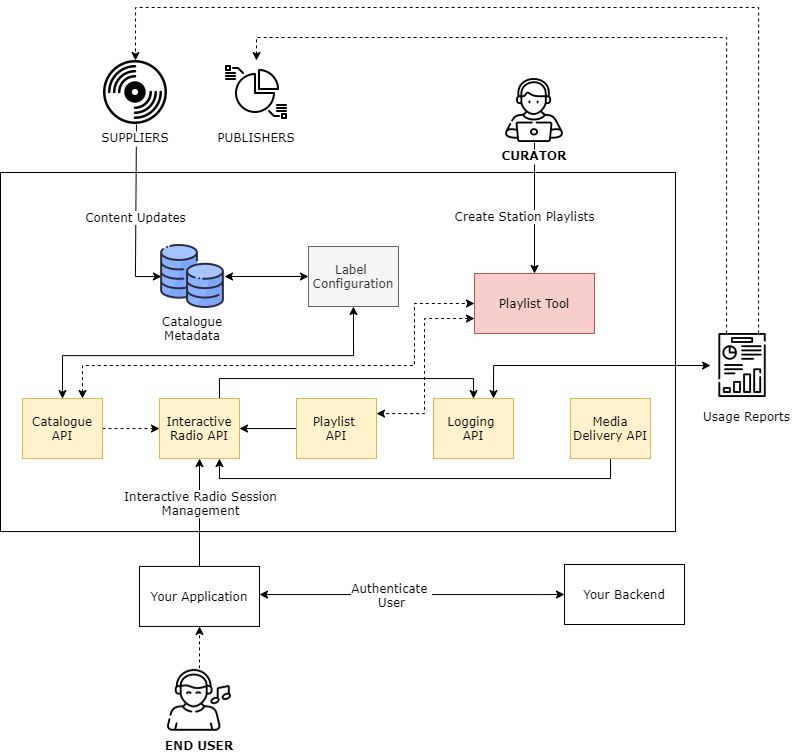
High-level integration overview
1. Accessing the Catalogue Metadata
1.1 Catalogue Events
The first integration step is to access the standard metadata for the catalogue. You should integrate with the Catalogue Events product, which pushes real time updates to the catalogue. The catalogue can then be stored and maintained within your own infrastructure for management of discovery and curation in your service.
Catalogue events are delivered as they're ingested by MassiveMusic, and therefore each event represents a snapshot of the release details at that time. Subsequent events should 'overwrite' the original event as they represent more recent updates to that release. There is a single event type, a Release Event. Each release event will contain metadata relating to the Artist(s), Release and Track(s) contained within that release, as well as availability data about the release.
Technical details on how to integrate with the Catalogue Events product can be found here.
2. What is Interactive Radio Streaming?
Interactive Radio Streaming services are typically referred to as radio-like experiences. These experiences limit user interactivity and follow playback rules in line with specific rulesets. MassiveMusic currently enables clients to build interactive radio services inline with DMCA and GVL rulesets.
DMCA
In the United States, the Digital Millennium Copyright Act (DMCA) simplifies radio licensing. By agreeing to follow a set of operational rules and to pay pre-determined royalty rates, “non-interactive” services can easily acquire the necessary blanket licenses. This process is typically simpler than negotiating directly with the rightsholders.
The typical ruleset is defined as follows:
- Tracks may not be played “on-demand”
- No more than three songs from one album per hour
- No more than two songs from one album played consecutively
- No more than four songs from a compilation per hour
- No more than three songs from a compilation played consecutively
- No more than four songs by the same artist per hour
- No more than six forward skips per hour and no rewinding
- Tracks cannot be cached locally for offline listening
- The service is not allowed to publish advance program guides or use other means to pre-announce an order of songs within a playlist or when particular sound recordings will be played
- A user may not listen to any playlists that he or she creates
- Continuous looped programs and playlists may not be shorter than three hours long
- An archived program must be at least five-hours long and cannot be made available for more than two weeks.
3. Creating your playlists
Each station you present within your Interactive Radio Service will be powered by tracks belonging to one or more playlists.
To create a playlist of tracks for use in your Interactive Radio Service, we recommend using the 7digital playlist tool. The 7digital playlist tool will only display your label cleared content to your curators. This tool is another client of the API platform, so you could build your own playlisting tool if you chose to do so (via the Playlist API). Playlists are stored in the platform as “Partner playlists”, each with their own ID .
A collection of sample requests for the Playlist API using Postman can be accessed here
4. Streaming tracks to your user's devices
By integrating with the Interactive Radio API, you can ensure your service adheres to DMCA or GVL playback rules. It will calculate the next available track from your chosen playlists and keeps a count of the number of skips your users are allowed to perform within a listening session.
A collection of sample requests for the Interactive Radio Streaming API using Postman can be accessed here
4.1 Create a listening Session
A listening session is used to control playback in-line with the ruleset your service is required to follow. It is important that a new session is created each time a station is launched as this will reset the permitted playback rules.
Use the following endpoint to create a new listening session:
| Attribute | Type | Description |
|---|---|---|
| playlistIds* | integer | The MassiveMusic playlist id's that you would like to create an interactive radio session from. |
Error codes:
- HTTP: 400 - The playlists requested are an invalid combination.
- HTTP: 401 - Invalid OAuth credentials provided.
- HTTP: 404 - One or more of the provided playlists do not exist.
4.2 Retrieve the next track details
Playback rules will result in your playlist tracks being reshuffled in order to comply with the rulesets. The Interactive Radio API will help retrieve the next track details, including streaming URLs, artwork and metadata. It will also define how many skips the user is allowed to perform.
Use the following endpoint to retrieve the next track for a listening session:
Error codes:
- HTTP: 404 - No tracks available for the given session, or session not found.
4.3 Report track playback events
Playback events such as track started, stopped, paused, resumed and skipped need to be reported back to the Interactive Radio API. These events influence the next track that can be played. and the number of skips allowed by the user.
Reporting playback events to the Interactive Radio API also contribute towards the generation of usage reports which are required by Labels and Publishers.
Use the following endpoint to report playback events:
| Attribute | Type | Description |
|---|---|---|
| trackId* | integer | The MassiveMusic trackId of the current track. |
| playlistId* | integer | The MassiveMusic playlistId of the playlist that the track belongs to. |
Error codes:
- HTTP: 404 - Session not found.
The following events should be specified in the API endpoint url {event}:
| Event | Description |
|---|---|
| playStarted | The current track has started to play. |
| playEnded | The current track naturally comes to an end. |
| playPaused | The current track has been paused. |
| playResumed | The current track has resumed playing. |
| playStopped | The current track has been stopped. |
| playSkipped | The current track has been skipped. |
Updated 11 months ago