

Building a Social Media Service (Self managed content delivery)
This guide is aimed at helping you build music into a social media service, or other similar scale B2C products. It will take you through the relevant concepts and API endpoints to help you integrate with the MassiveMusic platform.
In this guide, we will focus on a scenario where you are managing content delivery to your end users across multiple territories. If you prefer to stream content directly from the MassiveMusic platform click here.\
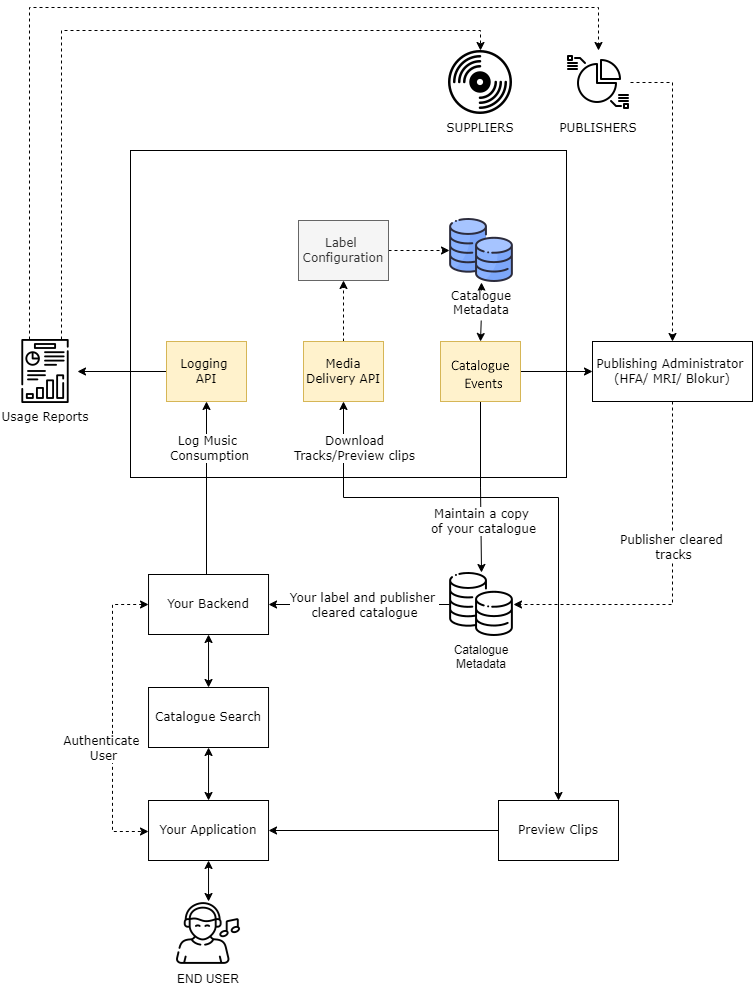
High-level integration overview
1. Accessing the Catalogue Metadata
1.1 Catalogue Events
The first integration step is to access the standard metadata for the catalogue. You should integrate with the Catalogue Events product, which pushes real time updates to the catalogue. The catalogue can then be stored and maintained within your own infrastructure for management of discovery and curation in your service.
Catalogue events are delivered as they're ingested by MassiveMusic, and therefore each event represents a snapshot of the release details at that time. Subsequent events should 'overwrite' the original event as they represent more recent updates to that release. There is a single event type, a Release Event. Each release event will contain metadata relating to the Artist(s), Release and Track(s) contained within that release, as well as availability data about the release.
Technical details on how to integrate with the Catalogue Events product can be found here.
2. Downloading Content
To manage your own content delivery and end user experience, you will download content from MassiveMusic, and store it centrally. You will need your licensors to agree to this approach, and may need to meet additional security requirements around content storage.
You should only store content that applies to their label deals. To identify content relevant to your licensor deals, reference the licensorID field of the Globals Feeds data, and licensor parameters found within it. MassiveMusic also supplies a licensor reference table to validate licensor names and IDs using the globally recognised DDEX party ID of that licensor.
The format for downloaded content should be AAC-160, a mid-quality streaming format appropriate for social media applications. This is formatID 56, for the purposes of use in subsequent API calls.\
2.1 Media Transfer
To download full tracks, you will use the Streaming - Media Transfer endpoint. Use the trackIDs specified in the Global Track Feed to identify the content you want to request. We recommend running multiple requests in parallel to expedite the download process.
To download tracks to your infrastructure, use the following endpoint:
| Attribute | Type | Description |
|---|---|---|
| trackId* | integer | The MassiveMusic ID of the track to be streamed. |
| formatId* | integer | The MassiveMusic ID of the format requested. Please contact us for available formats. |
| country* | string | ISO 2-character code of the country the end user resides in. |
Error codes
- 1001 - Error: Missing "parameter name" query parameter. Not all mandatory parameters were specified in the request.
- 1002 - Invalid value for "parameter name": parameter value. Value for parameter in error message is not valid.
- 2001 - Track not found. This track isn't available for streaming in your country.
2.2 Managing content on an ongoing basis
Once the initial download of content is complete, you should use the incremental Global Feeds to determine any new content available for download and request these via the Media Transfer endpoint. For Deletes specified in the Global Feeds, the downloaded content must be removed in order to remain in compliance.\
3. Content Availability
Before allowing a user to access a track for use in video, you must confirm the content is licensed for use in the user’s territory. There are two sources of availability data: one for the labels, and one for the publishers. Both groups of rightsholders must license the use of content before it can be accessed.\
3.1 Label Availability
MassiveMusic provides territory availability data from the labels in the Global Track Feeds, as described above.
In the Global Track Feeds data, the availableShopsAdSupported field will return a comma separated list of MassiveMusic territory IDs that track is available for. To map IDs back to names, please use the following reference document:
The mapping will remain constant and is never updated by MassiveMusic. Other availability data in the response is not relevant to this use case.\
3.2 Publisher availability
MassiveMusic integrates with Publishing Administrators, such as Blokur, Music Reports Inc. and Harry Fox Agency, to confirm publisher licensing for your catalogue. You will need a separate agreement with a publishing administrator to achieve this.
MassiveMusic are integrated with Publishing Administrators, and they receive our catalogue updates daily via the Feeds mechanism described above. For each track that MassiveMusic makes available, they match the track to their database to determine publisher ownership. They work to obtain clearances and report back track-by-track data back to you.
Before serving content to users, you should seek legal advice on clearances received from your Publisher Administrator and how to interpret them. Further documentation can be provided once you have an agreement with a Publishing Administrator.
You must maintain a daily updated copy of all availability data from labels and publishers, and check a track’s eligibility against this data in order to remain compliant.\
4. Reporting
Labels and Publishers require usage data to be reported back to them, as determined by your licensing agreements. To enable MassiveMusic to manage rightsholder reporting, you must log usage data back to MassiveMusic via the Preview Log API.\
4.1 Preview Log API
Multiple plays can be batched into a single JSON-formatted POST to this endpoint. The maximum batch size should be 100 logs, and requests should be limited to 10 requests per second.
A country parameter is required in the query string. This is for OAuth authorisation, and MassiveMusic recommends can be fixed to any territory, eg. UK, for these requests. The country property in the POST body is the location in which the user played the clip.
Any HTTP non-200 response means MassiveMusic has not saved any logs. When a 1008 error code is returned, one or more logs contains invalid data. In this scenario, no logs are processed, and the batch must be resubmitted when the error is resolved. Please refer to the error message and the error index to know which log failed in a batch, and for what reason.
{
  "logs": [
    {
      "country": "US",
      "trackId": 123456,
      "dateTimePlayed": "2014-03-13T11:39:28.8981203Z",
      "totalTimePlayed": 12,
      "userAgent": "Device version 3, App version 6",
      "userId": "ef6d126b-183e-42e3-9885-1aad11e262fe",
      "playMode":"online"
      "playType":"creation"
    }
  ]
}
Use the following endpoint to log Preview Clip usage data back to MassiveMusic:
A collection of sample requests for the Logging APIs using Postman can be accessed here
| Attribute | Type | Description |
|---|---|---|
| userId* | integer | The identifier of the user that played that track. Please note this must be in the body and is not a user id for authorisation purposes (as this endpoint is 2-leg OAuth signed). It's just for reporting purposes. The User ID value can be anything you want but it must be unique to each user and used consistently |
| country* | string | The 2 letter ISO 3166 country code, as with our other endpoints. Should be the country where the user originated the stream from (e.g. set to US if the stream was played by a US user). Please note: the query string parameter is for authorisation only and doesn't get logged, whilst the country in the body is for reporting purposes. These values can differ if you send multiple countries at once. |
| trackId* | integer | The MassiveMusic ID of the track that was streamed. |
| userAgent* | string | Details of the device model and application version used to play the track. Values over 256 characters will be truncated. |
| dateTimePlayed* | string | The date and time when the track was played. Needs to be in the ISO 8601 format, UTC time and should not be a date in the future or more than two months into the past. |
| totalTimePlayed* | integer | The total time the track was streamed, in seconds. Must be between 0 and 60 inclusive - 0 if it was only pre-fetched and never played. |
| playMode* | string | Either "online", "offline", or "online-cached". Logs should always be reported as “online”. |
| playType | string | Either “view” or “creation”. Indicates if the play was associated to a video creation or video view. Defaults to "view" if nothing is supplied |
Error codes
- 1008 - One or more logs are invalid. Refer to the index field to know which logs failed and why.
S3 bucket logger
- Alternatively, rather than using the API endpoint, you can use the S3 bucket logger to submit usage logs in Parquet format. See more details here.
Licensor Reporting Specifications
Labels and Publisher Administrators will share a reporting specification with you, which MassiveMusic's Reporting team will use to process and format the submitted usage data.
Updated 11 months ago