

Building a Streaming Service
This guide is aimed at helping you get started with creating a streaming service. It will guide you to the relevant API endpoints to help you integrate with the MassiveMusic platform.\
High-level integration overview
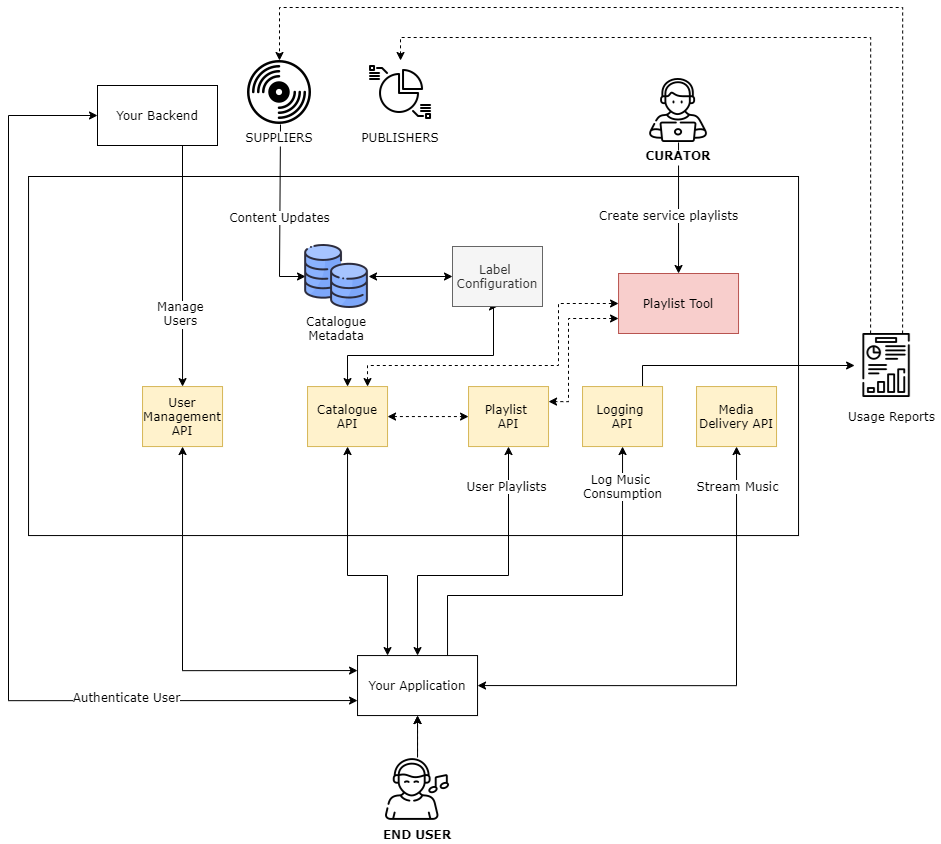
1. Accessing the Catalogue Metadata
1.1 Catalogue Events
The first integration step is to access the standard metadata for the catalogue. You should integrate with the Catalogue Events product, which pushes real time updates to the catalogue. The catalogue can then be stored and maintained within your own infrastructure for management of discovery and curation in your service.
Catalogue events are delivered as they're ingested by MassiveMusic, and therefore each event represents a snapshot of the release details at that time. Subsequent events should 'overwrite' the original event as they represent more recent updates to that release. There is a single event type, a Release Event. Each release event will contain metadata relating to the Artist(s), Release and Track(s) contained within that release, as well as availability data about the release.
Technical details on how to integrate with the Catalogue Events product can be found here.
2. Setting up your users
2.1 Creating users
For each user of your Subscription Streaming Service, you need to create a user with MassiveMusic. When creating a user simply use a unique identifier as MassiveMusic will not store any other identifiable or login information (e.g. passwords, usernames).
Use the following endpoint to create a new user:
| Attribute | Type | Description |
|---|---|---|
| userId * | string | Your 3rd party user identifier can be an arbitrary string up to 255 chars. The userId is permanent and cannot be changed once created. |
| country* | string | ISO 2-character code of the country the end user resides in. |
Error Codes1001 - Missing parameter - A required parameter is missing
1002 - Invalid parameter value - A parameter has been supplied with invalid value
2003 - User already exists - A user with this user id has already been created
3. Creating playlists
3.1 Service Curated Playlists
To populate your service with curated playlists, you can use:
- MassiveMusic Playlist Tool - contact us if you would like to create your playlist using the Playlist Tool.
- MassiveMusic Playlist API
Use the following endpoint to create a partner playlist via the MassiveMusic API.
| Attribute | Type | Description |
|---|---|---|
| country* | string | The ISO 2-character code of the country to which your oauth_consumer_key has access. |
| userId | string | The unique identifier of the user. For information on creating users click here. |
FORM DATA
| Data | Type | Description |
|---|---|---|
| name* | string | The name of the playlist |
| status | string | The status of the subscription must be set as active |
| visibility | string | The visibility of the playlist. Supported values are privateand public. |
| description | string | A description for the playlist |
| tracks | string | An array of objects, each of which can contain: trackTitle (string, optional): the name of the playlist item trackVersion (string, optional): the version of the item e.g. deluxe artistAppearsAs (string, optional): the artist name releaseId (string, optional): a unique identifier for the release releaseTitle (string, optional): the title of the release releaseArtistAppearsAs (string, optional): The artist of the release e.g. Various Artists releaseVersion (string, optional): The version of the release |
| annotations | string | A hash of any additional parameters to be saved |
Locating tracks for your playlistsTo locate tracks for your playlists, you can use the MassiveMusic Catalogue API to search for artists, releases or tracks.
3.2 User Playlists
You can use the same endpoint listed above to create a personal user playlists by specifying the user's userId. The "visibility" of this playlist can be set to "private" so that it is only visible to the user creating it and not available service wide.\
4. Streaming tracks
4.1 Streaming
Users can stream any track that is available for streaming in their applicable region.
Use the following endpoint to stream any track to your user:
| Query Parameters | Type | Description |
|---|---|---|
| trackId* | integer | The MassiveMusic ID of the track to be streamed. |
| formatId* | integer | The MassiveMusic ID of the format requested. Available Streaming Formats |
| country* | string | ISO 2-character code of the country the end user resides in. |
| Headers | Type | Description |
|---|---|---|
| range | string | Specify the byte range to be returned. |
Error Codes1001 - Error: Missing “parameter name” query parameter - Not all mandatory parameters were specified in the request.
1002 - Invaild value for “parameter name”: parameter value - Value for parameter in error message is not valid.
2001 - Track not found - This track isn’t available for streaming in your country or shop.
2002 - Pre-release or subscription availability - Either the user does not have a valid subscription account with us, or the track is not available for streaming (note that streaming release dates may differ from download or catalogue streaming release dates).
3201 - Simultaneous stream requests from multiple locations - streaming access temporarily disabled - When the clientId parameter is supplied, multiple devices will not be allowed to stream concurrently (see endpoint description above for more information).
5. Reporting usage back to rightsholders
Labels and Publishers require usage data to be reported back to them, as determined by your licensing agreements. To enable MassiveMusic to manage rightsholder reporting, you must log usage data back to MassiveMusic.
Information about logging activity
- If your label or publisher agreements require reporting on tracks using pre-fetched functionality but are never played on the device, they should be logged with a zero second play time.
- All tracks listened to when the device is offline must be reported as soon as Internet connectivity is restored.
Use the following endpoint to log usage data back to MassiveMusic:
Multiple plays can be batched into a single POST to the subscription/log endpoint and the body can be sent in either XML or JSON formats, subject to acceptable usage.
| Query Parameters | Type | Description |
|---|---|---|
| userId* | string | The unique identifier of the user. For information on creating users click here. |
| country* | string | The 2 letter ISO country code, as with our other endpoints. Should be the country where the user originated the stream from (e.g. set to US if the stream was played by a US user). Please note it can only be placed as a query string parameter, not in the POST body, or authorisation headers if those are used. |
| Form Data | Type | Description |
|---|---|---|
| userId* | string | The unique identifier of the user. For information on creating users click here. |
| trackId* | integer | The MassiveMusic ID of the track that was streamed. |
| releaseId* | integer | The MassiveMusic ID of the release that was streamed. |
| formatId* | integer | The MassiveMusic ID of the format streamed. Available Streaming Formats |
| dateTimePlayed* | string | The date and time when the track was played. Should be in the ISO 8601 format. |
| totalTimePlayed* | integer | The total time the track was streamed in seconds (or 0 if it was only pre-fetched and never played). |
| endReason* | string | The reason the track play was stopped. This is one of three values "naturalEnd", "userSkipped" or "other." "naturalEnd" would be used to indicate when a track has finished playing in its entirety. "userSkipped" would be used to indicate that a user has chosen to skip the currently playing track. "other" is used when the reason the track has been stopped doesn't fit into the previous catagories, for example when a user changes radio station. |
| userAgent* | string | Details of the device model and application version used to play the track. Values over 256 characters will be truncated. |
S3 bucket logger
- Alternatively, rather than using the API endpoint, you can use the S3 bucket logger to submit usage logs in Parquet format. See more details here.
Updated 11 months ago