

Building a Fitness Service
This guide is aimed at helping you build music into a fitness service for live and on-demand classes. It will take you through the relevant concepts and API endpoints to help you integrate with the MassiveMusic platform.
Postman public workspace
A collection of sample requests for each endpoint using Postman can be accessed here under Integration Guides.
Managing your licensed catalogueLicensing music for use in fitness requires you to get agreements with labels, who own the sound recordings, and publishers who own the written work. Your agreements are configured on the MassiveMusic platform, meaning your users and instructors will only be able to access content that is safe to use.
- Labels - Your labels agreements are managed by MassiveMusic. MassiveMusic receives and manages all your label feeds and reporting. We will filter your catalog based on the labels you choose to work with.
- Publishers - Most fitness services have "sync" licenses, and this means you will need agreements with individual publishers. As each song can be owned by multiple publishers/songwriters, your label catalog will then also be filtered by the publishing rights you have. MassiveMusic has integrations with publishing administrators, such as Blokur, Music Reports Inc. and Harry Fox Agency to achieve this.
High-level integration overview
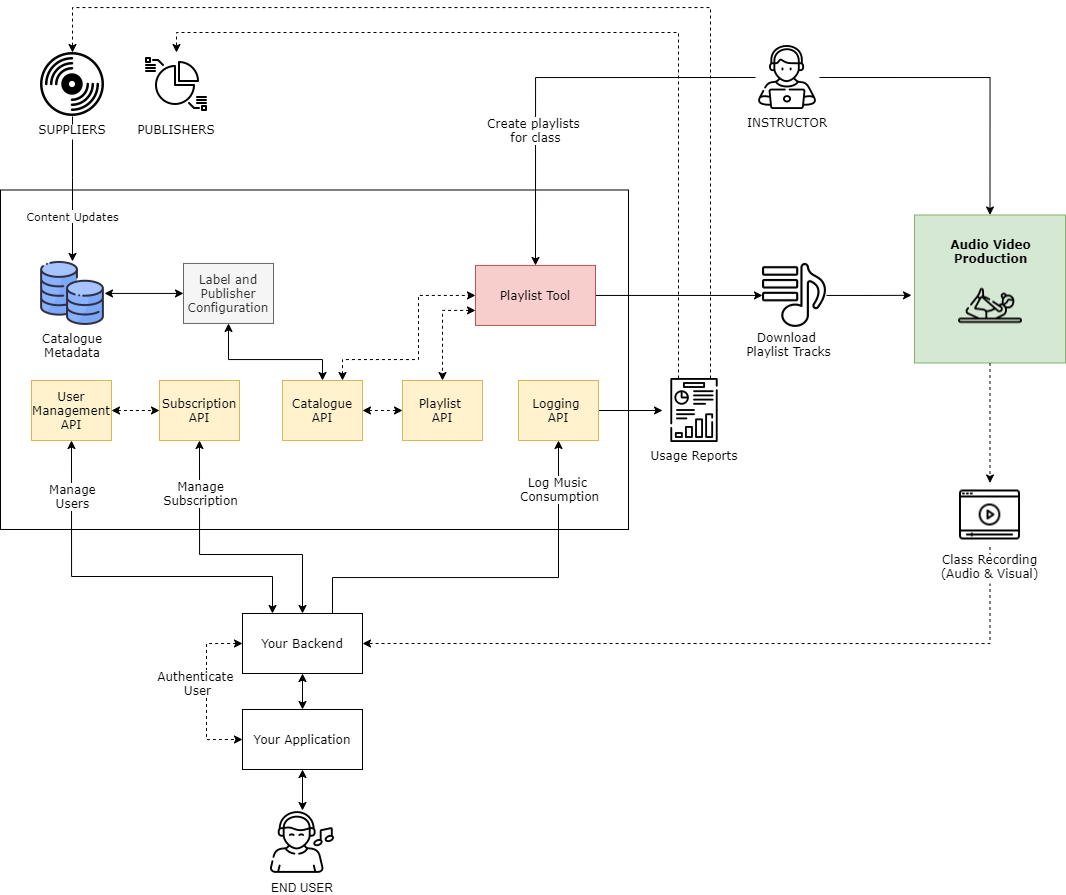
1. Accessing the Catalogue Metadata
1.1 Catalogue Events
The first integration step is to access the standard metadata for the catalogue. You should integrate with the Catalogue Events product, which pushes real time updates to the catalogue. The catalogue can then be stored and maintained within your own infrastructure for management of discovery and curation in your service.
Catalogue events are delivered as they're ingested by MassiveMusic, and therefore each event represents a snapshot of the release details at that time. Subsequent events should 'overwrite' the original event as they represent more recent updates to that release. There is a single event type, a Release Event. Each release event will contain metadata relating to the Artist(s), Release and Track(s) contained within that release, as well as availability data about the release.
Technical details on how to integrate with the Catalogue Events product can be found here.
2. Creating playlists
To create playlists of tracks for use in classes, we recommend using the MassiveMusic playlist tool. The MassiveMusic playlist tool will only display your label and publisher-cleared content to your instructors/curators. This tool is another client of the API platform, so you could build your own version into an “instructor” app if you chose to do so.
Each instructor can have their own login for creating and administering playlists. These playlists are stored in the platform as “Partner playlists”, each with their own ID.
3. Music playback
3.1 Mixing music tracks into workout videos
For a quality music experience, we recommend mixing the music tracks directly into your workout video, creating a single file that can be streamed to users. To do this, you can download tracks from the Playlist tool, or use the media transfer API. Once you have the files, embed them into your livestream or recorded video at source, for high quality audio playback. In this scenario, you will manage content delivery to your end users instead of MassiveMusic.
Alternative solutions may help you reduce video production costs, or get to market quicker. The MassiveMusic platform is designed to flexibly accommodate whichever path you choose, such as:\
3.2 In-room playback
The instructor downloads the playlists tracks from the playlist tool for playback. The music is played back via a speaker in the studio. Assuming a basic live streaming setup (one microphone), the music is then picked up along with all other audio, such as the instructor’s voice. This is the easiest & quickest to market, but will compromise music audio quality.
3.3 Customers stream music directly from MassiveMusic
When a class starts, users can stream the tracks from a determined playlist directly from the MassiveMusic platform. The livestream video and instructor audio is served to them independently. To do this, you’ll need to set up a subscription streaming service. This solution can result in “out of sync” video and audio. If music is more a background to the classes then this might be acceptable. However, if customers are doing activities to the beat of the music then it can be problematic.
4. Managing catalogue changes
The catalogue of music you have licensed will change over time. New releases will be added, but content can also be removed by the rightsholders. Although this scenario may only infrequently impact your content, you should have a system in place to process removals.
MassiveMusic processes takedowns daily. In a live workout, if content becomes unavailable it is flagged to the instructor and becomes unavailable in the Playlist tool. However, when music is embedded in a video file, and available to watch on demand, you need to record what tracks are in use in which videos.
To ensure tracks are still available, you will need the MassiveMusic track IDs for the music used.
For any given playlist, you can retrieve all the playlist details including the individual trackId's and titles by using the following endpoint:
| Attribute | Type | Description |
|---|---|---|
| userId* | string | Your 3rd party user identifier can be an arbitrary string up to 255 chars. The userId is permanent and cannot be changed once created. |
| country* | string | The ISO 2-character code your oauth_consumer_key has access. |
Next, use the Catalogue API to request track IDs in batch to check availability. Tracks that return as “errors” have been subject to takedowns by rightsholders. This process should be run daily, and can be done on a cron job.
You can request details for a batch of tracks, by using the following endpoint:
| Attribute | Type | Description |
|---|---|---|
| trackIds* | string | Contains a comma-separated list of track ids. Maximum of 500 items. |
| usageTypes* | string | Only use the usageTypes you need, e.g. download, subscriptionstreaming or adsupportedstreaming. |
| packageIds | string | Contains a comma-separated list of package ids. When specified, only tracks that have one of the specified packages will be returned. Used to filter searches to tracks that have at least one high quality format. Package ids are listed here. This parameter only takes effect when using 'usageTypes=download', and is otherwise ignored. |
| country* | string | ISO 2-character code of the country the end user resides in. |
| showErrors | boolean | When set true, the errors element is shown in the output, containing a list of errors. There will be one error for each track that could not be shown in the tracks list. The itemId on the error shows which track it relates to. The code and message relates to the reason why the track could not be shown. |
| imageSize | integer | The requested width of the image in pixels. Available image sizes are listed here. |
When a takedown occurs, you may be able to find the same sound recording still available in the catalogue under another release - for example in the single release instead of the original album release. When this happens you can simply report the new track ID as being used in the VOD content, and avoid rerecording or editing the video content.
When a takedown occurs and there is no like-for-like replacement, you can either remove that portion of the workout or take the whole video down so it cannot be accessed by your users.
5. Reporting usage back to rightsholders
Labels and Publishers require usage data to be reported back to them, as determined by your licensing agreements. To achieve this, you will need to create users, and subscriptions for these users in the MassiveMusic platform. You'll then use the user ID to log usage back to MassiveMusic. We will manage reporting your usage to licensed labels and also report to your publishing administrator, so they can report to publishers.
5.1 Creating users
For each user , you need to create a user with MassiveMusic. When creating a user simply use a unique identifier as MassiveMusic will not store any other identifiable or login information (e.g. passwords, usernames).
Use the following endpoint to create a new user:
| Query Parameters | Type | Description |
|---|---|---|
| userId * | string | Your 3rd party user identifier can be an arbitrary string up to 255 chars. The userId is permanent and cannot be changed once created. |
| country* | string | ISO 2-character code of the country the end user resides in. |
5.2 Setting up Subscriptions
You will need to set up a subscription against each user created with MassiveMusic. Subscriptions are used to facilitate reporting in line with your subscription tiers and associated royalties. The value of your subscription should be set to the notional value of music in your service, as determined by your licensing agreements.
MassiveMusic does not manage the billing process for subscription or facilitate any payments related to user subscriptions. You will need to process the billing yourself and notify MassiveMusic of new subscriptions or changes to existing accounts.
All MassiveMusic reporting to rightsholders takes place on a monthly basis. For this reason, a subscription period is set to a maximum of 1 month, and must be renewed for longer durations.
Use the following endpoint to create a subscription:
The body should be constructed in JSON.
| Body Parameters | Type | Description |
|---|---|---|
| userID* | string | A unique identifier for your user you created (ID, GUID etc.). It does not need to be personally identifiable information. |
| planCode* | string | The current subscription type. Please contact your Client Success Manager for more details on how to supply the correct planCode. |
| status* | string | The status of the subscription must be set as active. |
| currency* | string | ISO 4217 currency code, relating to the currency in which the subscriber is paying |
| recurringFee* | integer | The amount in cents charged to the subscriber for the current subscription. |
| country* | string | ISO 2-character country code where the subscriber is located. |
| activatedAt* | string | ISO 8601 UTC date-time format. The date and time when the user first activated any type of subscription. activatedAt must be now or earlier. |
| currentPeriodStartDate* | string | ISO 8601 UTC date-time format. The date and time when the current subscription started.CurrentPeriodStartDate must be no more than 1 day from now, and the same as or later than activatedAt. |
| trialEndsAt | string | ISO 8601 UTC date-time format. This is the date and time of when a trial period ends. If you are using a trail plan code, then this value must be populated. Otherwise this parameter must not be supplied. Please contact your Client Success Manager for more details on how to supply the correct planCode. Otherwise this parameter must not be supplied. TrialEndsAt must be later than currentPeriodStartDate and no more than 100 days from currentPeriodStartDate. |
| expiryDate* | string | ISO 8601 UTC date-time format. The date and time when the subscription is due to expire. ExpiryDate must be no more than 1 month from currentPeriodStartDate. If the subscription is a trial, expiryDate must also be the same as or later than trialEndsAt. In the exceptional case that trialEndsAt is more than 1 month from currentPeriodStartDate, expiryDate must be equal to trialEndsAt. |
5.3 Logging usage
With your users and subscriptions created, you can now report on consumption of tracks in your workouts. You should log usage data back to us using a JSON-formatted POST request to the Subscription Logging endpoint.
We recommend logging usage back to us in near real-time, such as when a class finishes. Where multiple tracks are embedded into a video, we typically expect clients to report all tracks back to us regardless of whether a user finished the workout or stopped partway through.
To log the usage data back to MassiveMusic, use the following endpoint:
| Query Parameters | Type | Description |
|---|---|---|
| userId* | string | The identifier of the user that played that track. The User ID value can be anything you want but it must be unique to each user and used consistently. |
Body parameters should JSON-formatted, and be nested within a playLogItem as per the example below. This allows you to submit multiple logs per request - for example for all tracks used within a workout.
{
  "playLogItem": [
    {
      "trackId": 123456,
      "releaseId": 123456,
      "formatId": 50,
      "playMode": "online",
      "dateTimePlayed": "2021-05-11T10:56:30Z",
      "totalTimePlayed": 6,
      "userAgent": "Device version 3, App version 6"
    }
  ]
}| Body Parameters | Type | Description |
|---|---|---|
| trackId* | integer | The MassiveMusic ID of the track that was streamed. |
| releaseId* | integer | The MassiveMusic ID of the release that was streamed |
| formatId* | integer | The MassiveMusic ID of the format streamed. |
| userAgent* | string | Details of the device model and application version used to play the track. Values over 256 characters will be truncated. |
| dateTimePlayed* | string | The date and time when the track was played. Should be in the ISO 8601 format. |
| totalTimePlayed* | integer | The total time the track was streamed in seconds. |
| playMode* | string | Either "online", "offline", or "online-cached". Indicates if the play was with an active or inactive network connection and, if the network connection is active, whether or not it was read from the device cache. |
S3 bucket logger
- Alternatively, rather than using the API endpoint, you can use the S3 bucket logger to submit usage logs in Parquet format. See more details here.
Updated 12 months ago